
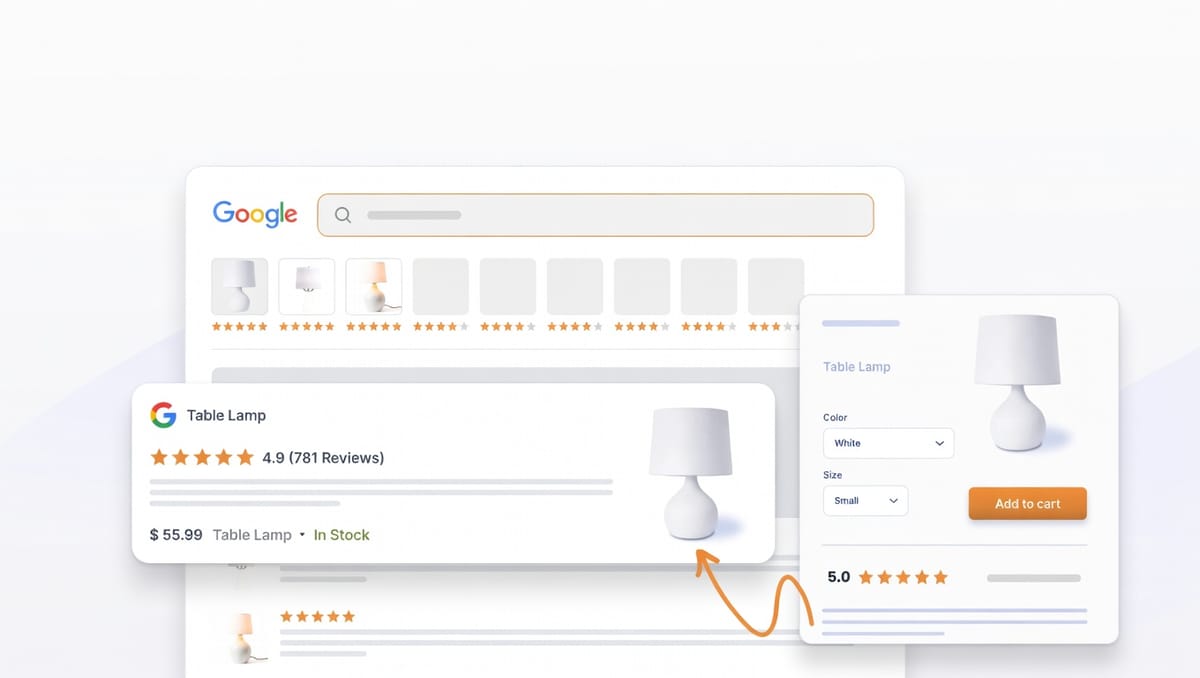
You've spent months working on SEO and your products finally rank on Google's first page. You're excited because page one visibility should mean more traffic and sales. But something's wrong. Your competitor ranks below you, yet they're getting more clicks. You check their listing and immediately see why. Five orange stars sit right next to their product title, while your listing shows just plain text.
Those stars are called rich snippets, and they're one of the most overlooked ways to increase organic traffic. Studies show that search listings with star ratings get 15-35% more clicks than listings without them, and when a shopper sees two similar products in search results, they almost always click the one with visible ratings.
The best part is that rich snippets are completely free. You don't pay for them like ads and you just need the right technical setup, which most review apps handle automatically. By the end of this article, you'll understand what rich snippets are, why they matter, how they work, and how to get them working on your store.
What Are Rich Snippets?
Rich snippets are extra information Google shows in search results beyond the basic page title and description. For e-commerce stores, this usually means star ratings, review counts, prices, and stock availability. A normal search listing shows your product title as a blue link, followed by your store's URL in green, and then a short description pulled from your page. That's what every listing looks like by default.
A rich snippet listing looks different because the product title still appears as a blue link, but underneath you see five stars with an average rating number, the total review count in parentheses, the price, and whether the item is in stock. All of this appears before someone even clicks through to your site.
Google shows this extra information because it helps shoppers make faster decisions. Instead of clicking through five different stores to compare ratings and prices, they can see key details right in the search results. For stores, this creates a major advantage because your listing stands out visually, builds instant credibility, and gives shoppers a reason to click yours over a competitor's plain text listing.
Rich snippets work through something called structured data, which is code added to your product pages that tells Google exactly what information to display. The code says "this is a product, here's the name, here's the average rating from customer reviews, here's how many reviews exist, here's the price," and Google reads that code, validates it, and then decides whether to show the information in search results.
The important thing to understand is that rich snippets aren't guaranteed because Google has the final say on whether your listing gets the enhanced display. But if you have proper structured data on your pages and genuine customer reviews, your chances of getting rich snippets are very high.
Why Rich Snippets Matter for E-commerce
The click-through rate difference is significant. When two listings appear in search results and one has star ratings while the other doesn't, the listing with stars consistently wins because shoppers instinctively trust the visual signal of a 4.5-star rating over a plain text description that claims the product is great.
This creates a competitive advantage that costs nothing beyond the time to set it up. Think about your own behavior when searching for products, because you probably gravitate toward listings that show ratings and reviews right in the results, and your customers do the same thing.
The trust factor works even before someone lands on your site. A 4.7-star rating visible in Google search results tells shoppers that other people bought this product and liked it, which means that social proof reduces hesitation and makes them more likely to click through and explore your store.
There's also a ranking benefit that most people miss. When your rich snippet listing gets more clicks than competitors, Google notices, and higher click-through rates signal to Google that your result is more relevant to searchers. Over time, this can improve your organic rankings, so you're not just getting more clicks from your current position but potentially climbing higher in results too.
A real example helps illustrate the impact. A mid-sized Shopify store selling outdoor gear ranked third for "waterproof hiking boots" while the two listings above them didn't have rich snippets configured. The third-place listing showed a 4.8-star rating with 89 reviews, and that store captured roughly 40% of total clicks from that search term despite ranking lower, simply because the star ratings made their listing more trustworthy and visually distinct.
The economics make sense too because paid ads cost money every time someone clicks, SEO takes time and ongoing effort, but rich snippets require a one-time setup and then work automatically as long as you keep collecting reviews. For the effort involved, the return on investment is extremely high.
How Rich Snippets Actually Work
The technical mechanism behind rich snippets involves structured data, which sounds complicated but works simply in practice. Structured data is code that sits on your product page and describes what the page contains in a format Google can easily read.
Google uses a standard format called schema.org for this data, and when you add schema markup to a product page, you're essentially labeling everything so Google knows exactly what it's looking at. The markup identifies the product name, the average rating from reviews, how many reviews exist, the price, and whether the item is in stock.
This code typically gets added to your page as JSON-LD, which is a specific format for structured data. The code sits in your page's HTML but doesn't display anything visible to customers, existing purely for search engines to read.
Most store owners never see or write this code manually because review apps handle it automatically. When you install a review app and start displaying reviews on your product pages, the app adds the necessary schema markup behind the scenes, and every time a new review gets added or your rating changes, the app updates the structured data automatically.
Google's process works like this: Google's crawlers visit your product page, find the schema markup, read the rating and review data, validate that the markup follows their guidelines, and then decide whether to display rich snippets in search results. This validation and display process can take anywhere from a few days to several weeks depending on how often Google crawls your site.
The key requirement is that reviews must actually appear on your product page where Google can see them. If your reviews live on a separate page or in a popup that only opens when clicked, Google typically won't show rich snippets, which means the reviews and the schema markup need to exist together on the main product page.
How to Get Rich Snippets on Your Store
The easiest path to rich snippets is using a review app that handles everything automatically. Most modern review apps like Kudobuzz add schema markup to your product pages as soon as you install them and start collecting reviews.
The process looks like this: you install the review app on your store, then start collecting customer reviews through automated email requests or by importing existing reviews from Google, Amazon, or other sources. Once you have at least three to five reviews per product, you enable review display on your product pages, and the app automatically adds the proper schema markup to those pages. Google crawls your site, finds the markup, validates it, and starts showing rich snippets in search results within a couple of weeks.
The critical piece is that reviews must be visible on the product page itself. Many apps let you put reviews in different locations like a separate reviews tab, a collapsible section, or a dedicated reviews page, but while these approaches can work for user experience, they often prevent rich snippets from displaying because Google expects to see reviews directly on the main product content area.
For Kudobuzz specifically, rich snippet markup gets added automatically to all product pages where reviews are displayed. You don't need to enable a setting or configure anything special, and as long as reviews appear on your product pages and you have at least 50 product reviews across all your products, the schema markup is working and Google will recognize it.
Regardless of which path you take, the validation step matters. Google provides a free tool called the Rich Results Test where you can paste your product page URL and Google will tell you whether valid schema markup exists and whether your page qualifies for rich snippets. This tool catches errors before you wait weeks wondering why rich snippets haven't appeared yet.
Common Mistakes That Prevent Rich Snippets
The most common problem is reviews that don't actually display on product pages. Some stores collect reviews but hide them below the fold, in collapsed sections, or on separate pages linked from the product, and Google's guidelines state that review content must be visible and accessible on the page where the schema markup exists. If reviews are too hidden or require extra clicks to see, Google may not show rich snippets even if the markup is technically correct.
Another frequent issue is not having enough reviews. Google typically requires at least three to five reviews per product before displaying rich snippets, so a single review or two reviews isn't enough to establish credibility, and Google won't enhance your listing until you cross that minimum threshold. If you're a new store with limited reviews, focus on getting those first few reviews per product rather than spreading one or two reviews across dozens of products.
Schema markup errors also prevent rich snippets. Common errors include missing required fields like review count, formatting problems in the code, or conflicts between multiple schema types on the same page, and the Rich Results Test tool will flag these errors with specific messages about what's wrong and how to fix it. Most issues come down to the review app's code conflicting with your theme's existing schema markup, which usually requires the app developer to provide a fix.
Some merchants configure their review app incorrectly. Certain apps require you to enable rich snippets or schema markup in the app's settings dashboard, so if that toggle is turned off, the markup won't be added to your pages even though the app is installed and functioning otherwise. Always check your review app's documentation to confirm rich snippets are enabled.
Timing expectations cause confusion too because rich snippets don't appear instantly after adding schema markup. Google needs to crawl your site, find the new markup, validate it, and then update search results, and this process typically takes three to twelve weeks. Some merchants panic after a few days when nothing has changed, but patience is necessary because as long as the Rich Results Test confirms your markup is valid, the snippets will appear once Google processes the update.
The last mistake is manipulated reviews. Google explicitly penalizes stores that use fake reviews, pay for only five-star reviews, or otherwise manipulate their ratings, so if your store shows a perfect 5.0-star average with 200 reviews but those reviews are clearly fake or all came from the same IP address within hours, Google may suppress your rich snippets permanently. Authentic reviews from real customers are the only sustainable approach.
Getting Started Today
Rich snippets represent one of the highest-leverage improvements you can make to your organic search presence. The setup takes minimal time if you're using a review app, the ongoing maintenance is automatic, and the impact on click-through rates is substantial and measurable.
The implementation path is straightforward: install a review app that supports schema markup automatically, like Kudobuzz, then start collecting reviews from customers through automated post-purchase emails. Import any existing reviews you have on Google, Amazon, or other platforms to build initial volume quickly, and make sure reviews display visibly on your product pages, not hidden in tabs or separate pages. Wait one to four weeks for Google to crawl your site and start showing rich snippets, then verify everything is working by searching for your products on Google and checking whether stars appear.
Most e-commerce stores overlook this opportunity entirely, so if your competitors aren't showing star ratings in search results and you are, you capture more clicks even if you rank lower on the page. That competitive advantage compounds over time as your improved click-through rates potentially boost your rankings further.