
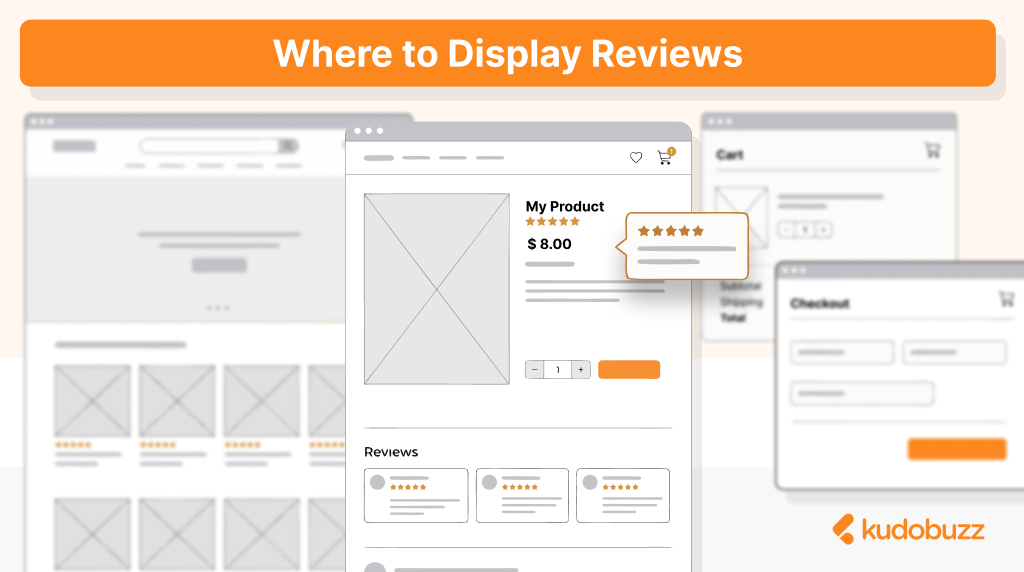
You've spent weeks collecting customer reviews. Your product pages finally have social proof, and your average rating looks solid. But where you display those reviews matters just as much as having them in the first place. Most stores put reviews on product pages and call it a day. That's a start, but it's leaving conversions on the table. Your reviews can work harder for you if you place them at every point where shoppers hesitate, question, or consider leaving.
This guide covers the highest-impact placements for your reviews and explains why each one works. By the end, you'll know exactly where to put your social proof to turn more browsers into buyers.
Product Pages: The Foundation
This is the obvious one, but it's worth getting right because product pages are where most purchase decisions happen. When a shopper lands on your product page, they're already interested. They clicked through from a collection page, an ad, or a search result. Now they're evaluating whether to buy. Reviews answer the questions running through their head: Is this product actually good? Will it work for me? Can I trust this store? The best placement is a star rating summary near the top of the page, ideally visible without scrolling, and then full reviews further down below the product description. Some stores place reviews above the Add to Cart button, which can work well for products where trust is the main barrier to purchase.
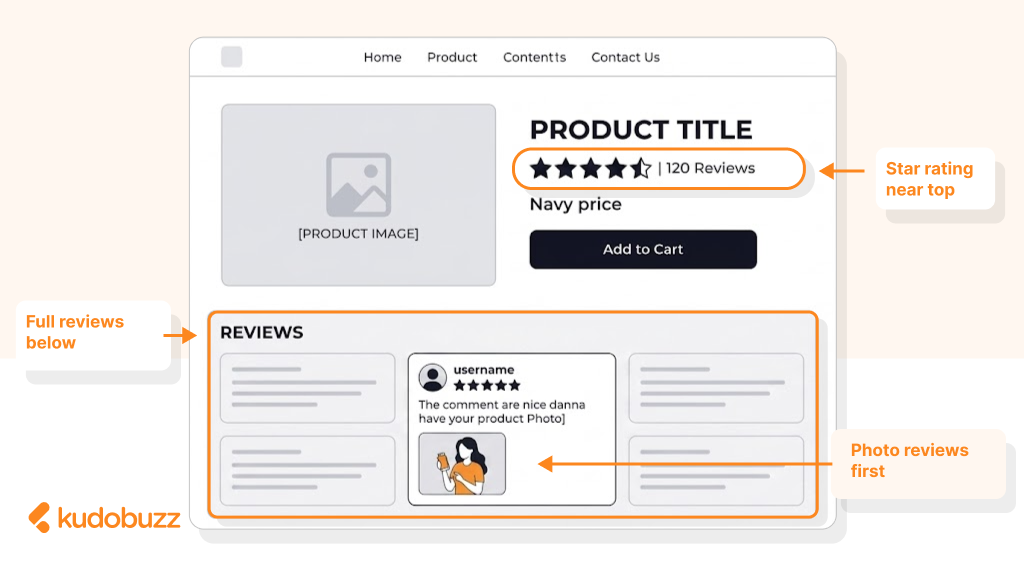
What you show matters too. Lead with photo and video reviews because they convert better than text alone. Shoppers want to see the product in real life, not just in your professional photography. A customer photo showing how a dress actually fits or how a gadget looks on a desk is more persuasive than any product description you could write.
Another tip is to highlight reviews that address common concerns. If shoppers frequently worry about sizing, feature reviews that mention fit. If shipping speed is a concern, surface reviews that praise fast delivery. The best reviews answer objections before shoppers even raise them. It is also important to note that that those reviews answer asked questions, it does so passively. That is why there is the need to have live chat to also cater to questions. Reviews answer asked questions passively; live chat handles the live ones reviews can't.
Homepage: The First Impression
Your homepage is often the first thing new visitors see, and first impressions shape everything that follows. A homepage with visible social proof immediately signals that real people buy from you and are satisfied with their purchases. The best placement is below the fold, after your hero section and main value proposition. You don't want reviews competing with your primary message, but you do want them visible as shoppers scroll down and start evaluating your brand.
On the homepage, business reviews work better than product-specific ones. You're not selling a single product here; you're selling your store as a trustworthy place to shop. Reviews that mention great customer service, fast shipping, easy returns, and overall satisfaction build confidence in your brand as a whole.
Keep it focused. A carousel showing three to five of your best reviews is plenty. Overwhelming visitors with dozens of testimonials on the homepage creates clutter and dilutes the impact. Choose reviews that are specific, enthusiastic, and mention different aspects of the customer experience.
Collection and Category Pages
This placement is often overlooked, but it can significantly reduce bounce rates and help shoppers find products they're more likely to buy. When someone browses a collection page, they're scanning thumbnails and deciding which products deserve a closer look. Adding star ratings beneath each product image gives them a quick signal about quality. A product with a 4.8 rating and 47 reviews stands out next to products with no rating at all.
The goal here isn't to show full reviews. You just need the average rating and review count displayed beneath the product thumbnail. This small addition helps shoppers filter mentally and click on products that other customers have validated.
For stores with large catalogs, this is especially valuable. Instead of clicking randomly and bouncing back repeatedly, shoppers can use ratings as a guide. They spend less time on products that won't convert and more time on products with proven appeal.
Cart Page: Reducing Abandonment
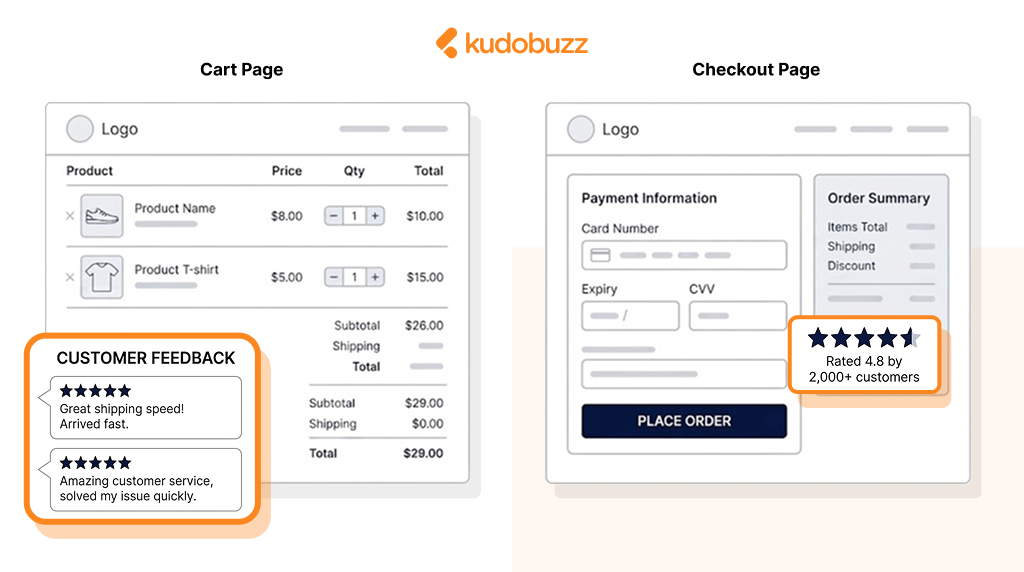
Cart abandonment is one of the most frustrating problems in e-commerce. Someone added a product, got all the way to the cart, and then left without buying. Often, this happens because doubt creeps in at the last moment. Placing reviews on your cart page addresses that doubt right when it matters most. A short section showing one or two trust-building reviews, plus your overall store rating, can be the nudge that keeps shoppers moving toward checkout.
The reviews you show here should focus on trust and reliability rather than product features. Look for reviews that mention fast shipping, great packaging, easy returns, or responsive customer service. These reassure shoppers that buying from you is safe and that their order will arrive as expected.
Keep the placement subtle. You don't want to distract from the cart itself or the checkout button. A small section near the order summary or below the cart items works well. The goal is reassurance, not persuasion, because the shopper has already decided they want the product.
Checkout Page: Final Reassurance
The checkout page is where shoppers commit. They're entering payment information and trusting you with their money. Any lingering doubt at this stage can kill the sale. Reviews on the checkout page should be minimal and focused entirely on trust. A star rating with "Rated 4.8 by 2,000+ customers" is often enough. You can pair this with trust badges showing secure payment, money-back guarantees, or free returns.
The key is to keep it clean. Checkout pages should be focused on completing the purchase, not browsing content. A sidebar element or a small section below the payment form works better than anything that competes for attention with the checkout process itself. Some stores test removing all distractions from checkout, including reviews. Others find that a small trust element increases completion rates. The right approach depends on your audience, so it's worth testing both versions to see what works for your store.
Dedicated Reviews Page
Not every shopper makes quick decisions. Some want to read everything they can find before committing, especially for higher-priced products or first-time purchases from an unfamiliar brand. A dedicated reviews or testimonials page serves these researchers. It gives them a place to dig deep, read dozens of reviews, and satisfy their need for thorough evaluation. Without this page, these shoppers might leave your site and search for external reviews elsewhere, and they might not come back. Link to your reviews page from your main navigation, your footer, and your product pages. Make it easy to find for anyone who wants it.
The page itself should show all your reviews with filters for sorting by rating, product, or keyword. Let shoppers find the specific feedback they're looking for. Someone buying running shoes might filter for reviews mentioning "wide feet" or "arch support." Someone buying skincare might search for "sensitive skin" or "acne."
There's an SEO benefit here too. A reviews page with lots of user-generated content can rank for searches like "your brand reviews" or "your brand testimonials." These searches indicate high purchase intent, so capturing that traffic is valuable.
Pop-ups and Slide-ins
Used sparingly, pop-ups and slide-ins can highlight social proof at key moments without disrupting the shopping experience. The most common approach is a small notification that slides in from the corner showing recent activity. "Sarah from Lagos just purchased this item" or "James just left a 5-star review" creates urgency and social proof simultaneously. It tells shoppers that other people are buying and that those buyers are happy.
Exit-intent pop-ups are another option. When a shopper moves their cursor toward the browser's close button, a pop-up can appear with a compelling review and a reason to stay. This works best when combined with an offer, like a discount code, but the review adds credibility to the offer.
The warning with pop-ups is overuse. Too many interruptions annoy shoppers and hurt the overall experience. One well-timed notification is helpful. Five pop-ups on every page is obnoxious. Test carefully and watch your bounce rates to make sure you're helping rather than hurting.
Email Marketing
Your reviews can work for you even before shoppers visit your site. Including social proof in your email marketing builds trust early and increases click-through rates. Welcome emails are a perfect place to introduce new subscribers to your happy customers. A section showing your overall rating and a couple of standout reviews tells new subscribers that real people love your products. This sets expectations and primes them to buy. Abandoned cart emails benefit from reviews too. Someone who left without buying might just need a small push. Including a review of the product they abandoned, especially one that addresses common objections, can bring them back to complete the purchase.
Promotional emails can feature reviews of the specific products being promoted. Instead of just showing a product image and price, add a short quote from a happy customer. "Best purchase I've made all year" carries more weight than any marketing copy you could write.
Social Media and Ads
Reviews make your advertising more effective because they shift the message from "we think our product is great" to "our customers think our product is great." In Facebook and Instagram ads, you can use screenshots of reviews, video testimonials, or simply overlay a star rating on your product images. Ads featuring real customer feedback tend to outperform standard product ads because they feel more authentic and less salesy.
Video reviews are especially powerful in social ads. A real customer talking about their experience creates a connection in a way that polished brand content cannot. Even a simple selfie video shot on a phone can outperform a professionally produced ad because it feels genuine.
Google Shopping ads can also display star ratings if you have Google Seller Ratings enabled. Those yellow stars in the search results catch the eye and signal quality before shoppers even click, and products with ratings tend to get more clicks than products without them.
Google Search Results
Speaking of Google, reviews can appear directly in search results through rich snippets. When someone searches for a product you sell, your listing can show star ratings and review counts right in the search results. This matters because search results with stars stand out from plain text listings. Studies show that rich snippets increase click-through rates by 15 to 35 percent. You're competing for attention against every other result on the page, and stars give you an advantage.
Getting rich snippets requires structured data markup on your product pages. This is technical but not complicated, and most review apps, including Kudobuzz, handle it automatically. The markup tells Google where your reviews are and how to display them.
If you want to dive deeper into rich snippets, we have a full guide on implementing them for e-commerce stores. The short version is that this is one of the easiest ways to increase organic traffic without changing your SEO strategy or creating new content.
Placement Cheat Sheet
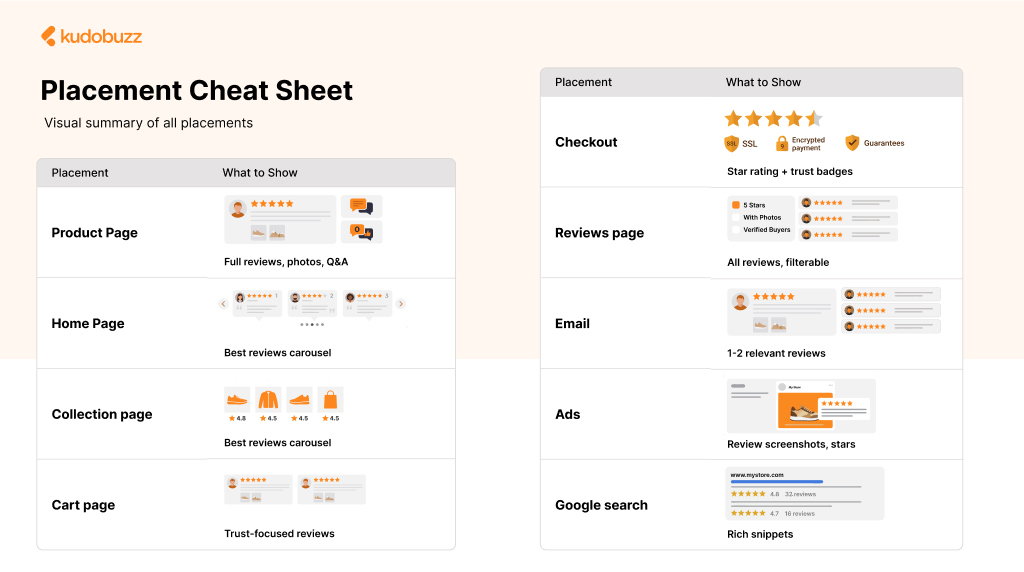
Here's a quick reference for where to display reviews and what to show in each location:
- Product pages are where you show everything. Full reviews, photo and video content, Q&A, and detailed ratings all belong here because shoppers are actively evaluating whether to buy.
- Your homepage should feature a carousel of your best business reviews. Keep it to three to five reviews that build trust in your brand overall.
- Collection pages need just star ratings on product thumbnails. This helps shoppers scan and decide which products to explore further.
- The cart page calls for trust-focused reviews about shipping, service, and reliability. One or two reviews plus your overall rating is enough.
- Checkout should be minimal. A star rating and review count paired with trust badges provides reassurance without distraction.
- A dedicated reviews page gives researchers everything they want with filters and search to find specific feedback.
- Email marketing benefits from one or two reviews relevant to the message. Welcome emails, abandoned cart emails, and promotional emails can all include social proof.
- Ads perform better with review screenshots, video testimonials, or star rating overlays. Real customer feedback makes advertising feel more authentic.
- Google search results can show your star ratings through rich snippets, which significantly increases click-through rates.
Getting Started
If you're only showing reviews on product pages right now, that's a reasonable starting point, but there's room to grow. The placements that typically deliver the biggest impact after product pages are homepage reviews, cart page reassurance, and email integration.
Start by adding a reviews section to your homepage. This takes minimal effort and immediately builds trust with new visitors. Next, test a small trust element on your cart page and watch whether it affects your abandonment rate. Then look at your email flows and find opportunities to include customer feedback.
Alongside social proof, a behaviour-triggered offer built with the Popupsmart popup builder is another conversion tactic a store can test when shoppers hesitate or prepare to leave.
The stores that get the most value from reviews are the ones that put their reviews where shoppers will see them at the right moments. Every point of hesitation is an opportunity for social proof to do its job.